Acropolis Dynamic Scheduling (ADS) is the scheduler built into every Nutanix AHV cluster. It decides on which host a VM starts, keeps an eye on CPU, storage controller and memory contention across all hosts, and live-migrates VMs only when a workload doesn’t get the resources it is entitled to. You hardly need to configure it, and that is exactly what I like about it. It doesn’t stop at your own data center either. When you run Nutanix Cloud Clusters (NC2) on bare metal in AWS, Azure, Google Cloud or OVHcloud, ADS comes along and does the same job for your workloads in the public cloud. Not something you get with native cloud VMs.
In this blog post, I would like to take you through what ADS does, which metrics it uses to make placement and balancing decisions, and why it matters even more when you run NC2 in a public cloud. A big thanks goes out to Rahul Devaraju for his excellent write-up Nutanix AHV Internals: Meet the Smart Scheduler Behind Every AHV Cluster on the Nutanix Tech Center, which I used as a key source.
To spoil the ending: ADS makes sure every workload gets the resources it is entitled to, and it only moves VMs when it has to.
What is ADS?
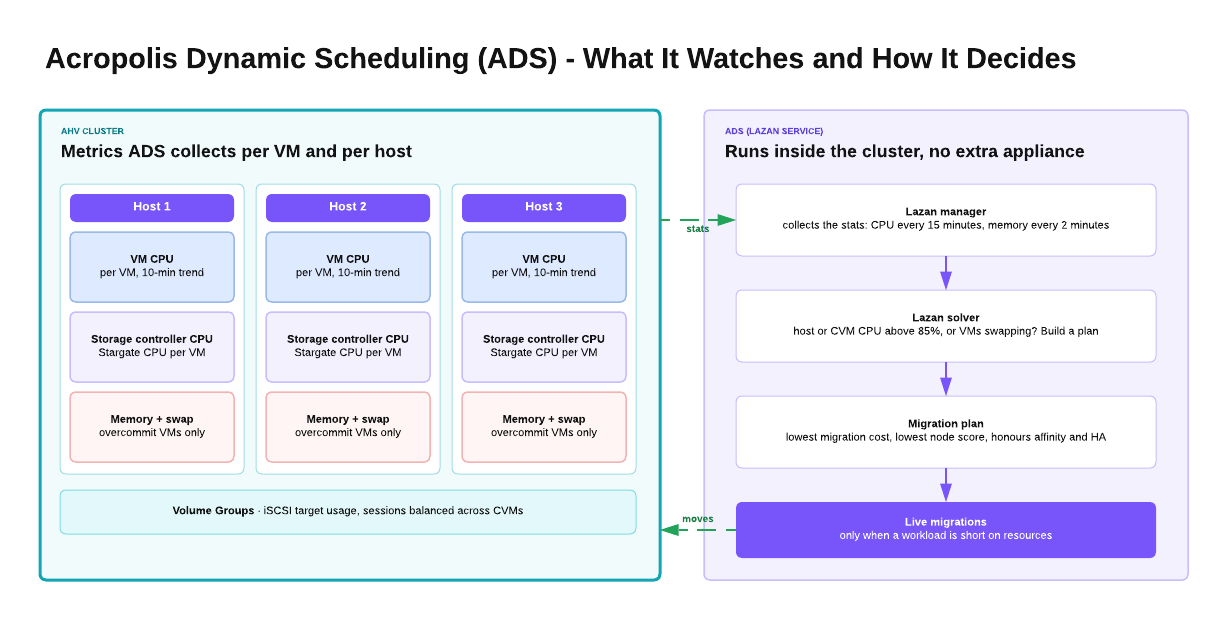
ADS is the cluster-level scheduler built into every AHV cluster. Under the hood, a service called Lazan does the work. AOS picks a Lazan manager and a Lazan solver among the hosts in the cluster. The manager gathers the statistics, the solver looks for anomalies and builds a plan, and the manager kicks off the resulting actions, typically live migrations. No external management server, no separate appliance to deploy and patch. It runs where the cluster runs.
ADS has two jobs:
- Initial placement: when you power on or create a VM, ADS picks the host it lands on.
- Contention remediation: while VMs run, ADS watches for hotspots and resolves them.
ADS is enabled by default, also in NC2 clusters, and it’s recommended to keep it that way.
Entitlement, not balance
Here is the thing many people miss: ADS is not an active load balancer. It doesn’t chase a perfectly even cluster. Why not? Well, every live migration costs something. The hypervisor copies VM memory across the network, burns CPU cycles on both source and destination host, and the VM takes a short hit during switch-over. Moving VMs around just to make a utilization chart look nice means you spend resources on the scheduler instead of on your workloads.
So ADS asks one simple question: is any workload not getting what it’s entitled to? If one node runs at 70% CPU and another at 30%, nobody suffers, and ADS leaves it alone. Only when real contention shows up does it act.
A balanced cluster is not the goal. Happy workloads are.
The metrics ADS uses
So what does ADS actually look at? It monitors resource usage per VM and per host, and it flags contention on the following signals:
| Resource | What ADS measures | Contention when | Checked every |
|---|---|---|---|
| Host CPU | CPU utilization of each VM on the host | Host CPU utilization exceeds 85% | 15 minutes |
| CVM storage controller CPU | Storage controller (Stargate) CPU usage per VM | CVM storage controller CPU exceeds 85% | 15 minutes |
| Memory (overcommit only) | Memory usage and swap of overcommit-enabled VMs | VMs swap to disk on the host | 2 minutes |
| Volume Groups | iSCSI target usage | Uneven iSCSI session load across CVMs | n/a |
For CPU and CVM CPU, ADS doesn’t react to a single sample. It looks at the trend over the last 10 minutes. That filters out short spikes, like a boot storm in the morning, so ADS doesn’t start migrating VMs for something that resolves itself a minute later.
The storage controller metric is the one I find most interesting, because it’s very HCI-specific. In a hyperconverged cluster, storage I/O costs CPU cycles on the Controller VM (CVM). One VM that hammers storage can load up its local CVM, while host CPU still looks fine. A compute-only scheduler would never notice. Because ADS tracks Stargate CPU usage per VM, it knows which VM causes the load and moves that one. For Nutanix Volume Groups, ADS spreads the iSCSI sessions from external targets across the CVMs in the cluster.
And memory? Interestingly enough, memory is only a contention signal for VMs with memory overcommit enabled. By default, AHV backs every VM’s configured memory with physical memory. No overcommit means no memory contention, so there is nothing to rebalance. Admission control simply refuses a VM that doesn’t fit. When you do enable memory overcommit, ADS manages the shared physical memory pool between those VMs. Every 2 minutes it checks memory usage and swapping to decide which VM needs more memory and which VM can give some back through ballooning.
Note: You will still find older documentation and community posts stating that ADS doesn’t monitor memory at all. That was true before memory overcommit arrived in AOS 6.1. ADS doesn’t monitor network utilization, and Nutanix doesn’t document metrics like CPU ready or steal time as ADS inputs. It works on utilization.
What about NUMA? I get this one a lot, and you’ll even find study guides claiming ADS enforces NUMA boundaries. Nutanix doesn’t document anything like that for ADS. ADS decides which host a VM runs on. Where the VM lands within that host, which socket and which memory, is the job of AHV itself. AHV maps each vNUMA node of a wide VM onto a single physical NUMA node, and with AHV 11.2 and NCI 7.6 it adds topology-aware placement that keeps CPU, memory, GPU and NIC on the same socket for AI workloads. Two layers, two schedulers. Keep in mind that, as far as the documentation goes, ADS looks at utilization of the host as a whole. One busy socket on an otherwise quiet host is not something ADS reacts to.
How ADS decides what to move
Once ADS detects contention, it builds a migration plan that brings all nodes back within 85%. To choose which VM goes where, it uses two values:
- Migration cost per VM, based on configured memory and attached GPU resources. For overcommit VMs, ADS also counts actual memory usage including swap.
- Node score per host, based on CPU, memory and GPU utilization. The busier the host, the higher the score.
ADS first tries to keep the total migration cost as low as possible, as long as the result doesn’t create new contention. When several destinations work, it picks the host with the lowest node score. Think about what that means: moving a VM with 512 GiB of configured memory takes a lot more time and network bandwidth than moving a 16 GiB VM, even when both burn the same amount of CPU. ADS prefers the cheap move.
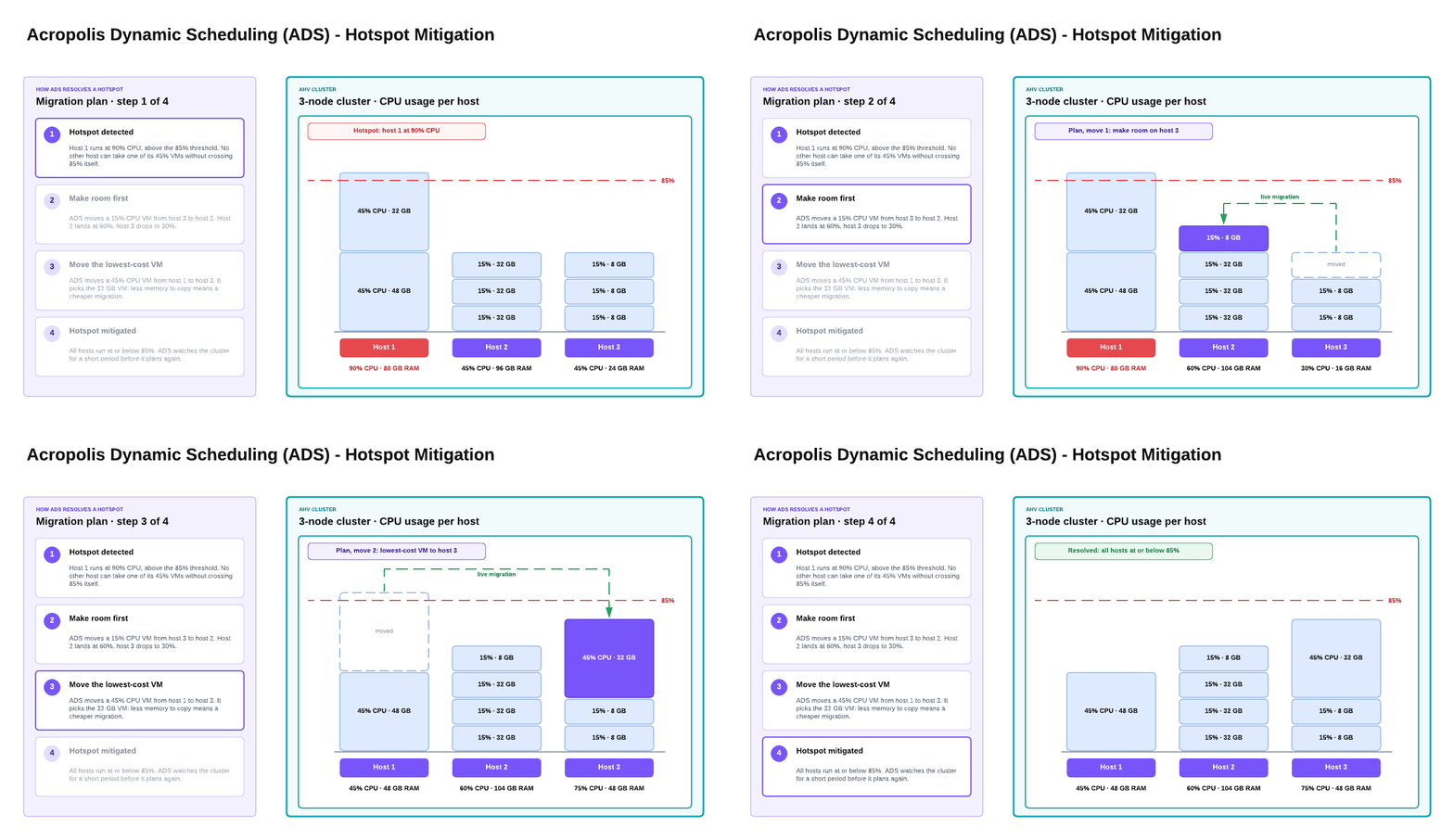
The plan doesn’t have to be a single hop either. Take the example below, the same one we use in our NC2 tech deck and that Rahul uses in his blog. Host 1 runs at 90% CPU, and neither of its 45% VMs fits on another host without pushing that host over 85%. So ADS first moves a 15% CPU VM from host 3 to host 2 to free up room on host 3. Then it moves one of host 1’s 45% VMs to host 3. Which one? The one with 32 GB of memory rather than 48 GB, because less memory to copy means a cheaper migration. Every host ends up at or below 85%. That’s a chess move, not a shove.
A few more behaviours are worth knowing:
- When multiple contentions occur at the same time, ADS tries to solve all of them in one plan. If it can’t do that while honouring every policy, it doesn’t create a plan at all and raises an alert instead.
- After a plan completes, ADS watches the cluster for a short period before it starts a new one. No ping-pong.
- For memory contention, ADS first tries to resize the memory pool of the overcommit VMs. Only when the host runs out of physical memory does it attempt a migration plan, every 15 minutes.
- During host, firmware or AOS upgrades, ADS doesn’t rebalance for contention.
Initial placement follows the same logic. When no host has enough room or meets the VM’s policies, ADS rearranges running VMs to make room. If that rearrangement would cause contention, ADS rejects the new VM. Better to refuse one VM than to hurt all the others. For vGPU workloads, ADS can even move VMs off a GPU card to free it up, so AHV can partition that card into the vGPU profile the new VM needs.
The rules it plays by
ADS never solves one problem by creating another. It respects:
- VM-host affinity: always strictly enforced.
- VM-VM anti-affinity: soft during initial placement, because starting the VM beats not starting it. During remediation, ADS rejects any migration that would violate it.
- Guaranteed HA: ADS keeps enough capacity reserved to restart VMs after a single or dual node failure, depending on what you configured.
- GPU compatibility: a VM with a vGPU profile only moves to a host with a compatible GPU card.
Curious what ADS did in your cluster? In Prism Central, go to Infrastructure > Activity > Audits and filter on Operation Type “Migrate”. Every ADS migration shows up there.
Simplicity by design
Coming from the vSphere world, I spent a lot of time with customers discussing DRS automation levels and migration thresholds. With ADS, that discussion is pretty short. There is no aggressiveness slider. ADS is either on or off, and it is on by default.
Is that a downside? In my opinion, mostly not. Fewer knobs means fewer ways to misconfigure a cluster, and less time spent second-guessing the scheduler. When you need specific placement, for licensing or availability reasons, you express that with affinity policies. You don’t tune the scheduler for it. To be fair, if you love fine-grained tuning for edge cases, you’ll miss some control. My advice here: leave ADS on and let it do its job.
Keep in mind: ADS is a scheduler, not a capacity planner. When a cluster is simply too full, there is no migration plan that fixes it. ADS raises an alert, and the answer is more capacity or fewer workloads. Which brings me to NC2…
The NC2 perspective
This is where it gets really interesting for me. With NC2, you run the same Nutanix stack on bare-metal nodes in AWS, Azure, Google Cloud, or OVHcloud. Once deployed, it’s ‘just another’ Nutanix cluster, and ADS runs on it exactly as it does on-prem. Same thresholds, same policies, same audit trail, and nothing to configure.
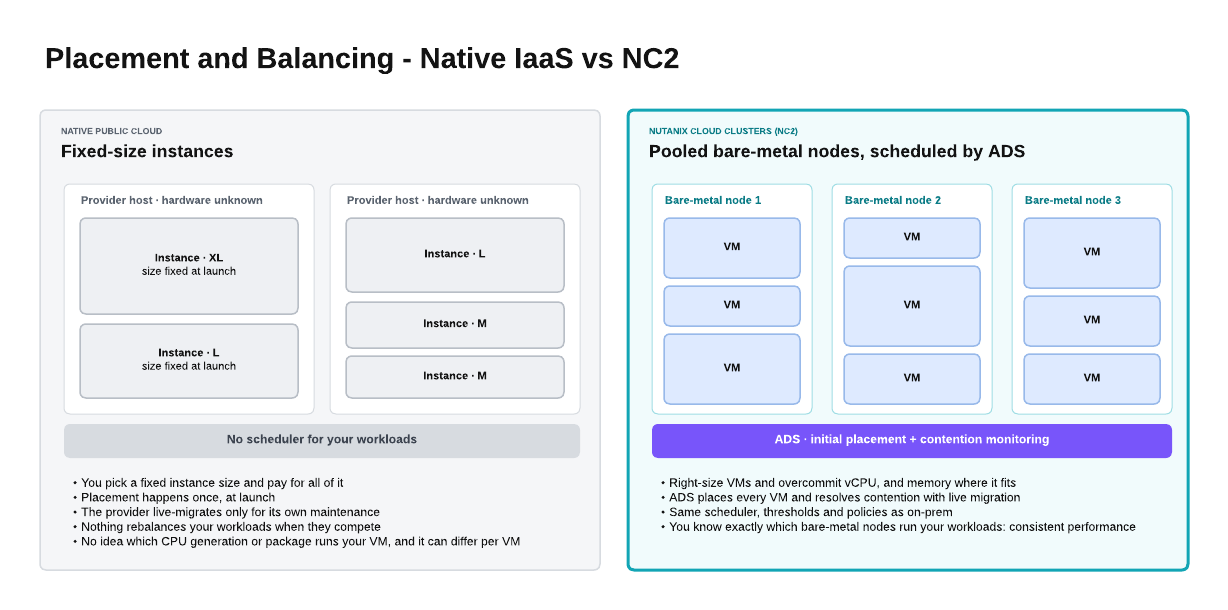
Why does that matter? Because native public cloud IaaS doesn’t give you this. When you launch a native VM, you pick a fixed instance size, and the hyperscaler places it on a host. The hyperscaler does live-migrate instances, but for its own host maintenance. AWS even does this for EC2 Dedicated Hosts nowadays. What you don’t get is a service that watches contention between your workloads and moves them around to make sure each one gets what it’s entitled to. Not on shared tenancy, and not on dedicated hosts either, where auto-placement only happens at launch.
The funny thing is, in the native model you don’t really need it. Each instance is a fixed slice with no overcommit, and you pay for the full slice whether you use it or not. Contention is the provider’s problem, hidden from you. When a workload needs more, the fix is a bigger ‘t-shirt’ size and a bigger bill.
NC2 flips that around. You get dedicated bare-metal nodes and pool their compute and storage resources. You right-size VMs instead of rounding them up to the next t-shirt size, you overcommit vCPUs, and you can enable memory overcommit where it makes sense. And because you know exactly which bare-metal nodes your workloads run on, you get consistent performance, instead of whatever CPU generation the provider happens to give each VM. I wrote about that sizing efficiency in NKP with NC2: A Strong Architectural Choice. Fewer bare-metal nodes equals less cloud spend. But here’s the catch: denser consolidation without a scheduler is asking for noisy neighbors. You become the provider, so contention becomes your problem.
That is exactly the gap ADS fills. It is the safety net that lets you consolidate harder in the public cloud, while every workload still gets the CPU, storage controller, and memory resources it’s entitled to. And when ADS tells you the cluster is out of room? In NC2, that alert has an easy answer: add a bare-metal node in far less time than any hardware procurement cycle takes.
To conclude
ADS doesn’t try to make your cluster look balanced. It makes sure your workloads get what they are entitled to, based on host CPU, CVM storage controller CPU, and for overcommitted VMs, memory. It moves the cheapest VMs to the least busy hosts, respects your affinity and HA policies, and otherwise stays out of the way. All of that with a single on/off switch. On NC2, you get the same scheduler in the public cloud, which is what makes right-sizing and consolidation on bare metal safe to do. Not something you get with native cloud VMs.